
Mechs vs Kaiju's Ragdoll Robux Shop: Where It Is and How to Redeem Codes
Find the Robux Shop in Mechs vs Kaiju's Ragdoll via the green ROBUX SHOP button in the top-right of the lobby, scroll to the bottom of the shop and redeem codes in the TYPE A CODE box after joining the Mechs vs Kaiju Studios group.
Quick answer
The Robux Shop opens from the game lobby: click the green ROBUX SHOP button at the top-right corner of the screen, then scroll to the very bottom of the shop, where the code redemption box sits. Enter a code in the TYPE A CODE box and click REDEEM to collect the reward.
- Codes are designated for group members: like + favorite the game and join the Mechs vs Kaiju Studios group to use them.
- Each code works once per account.
Where the Robux Shop is
The Robux Shop is not a place you walk to on the map — it opens straight from the menu. When you load into the lobby, the menu shows buttons for PLAY, MECHS, ROLL MECHS, SETTINGS and REPORT A BUG, and the green ROBUX SHOP button sits among them at the top-right corner of the screen. Click it and the shop window opens on top of the game, ready to browse.
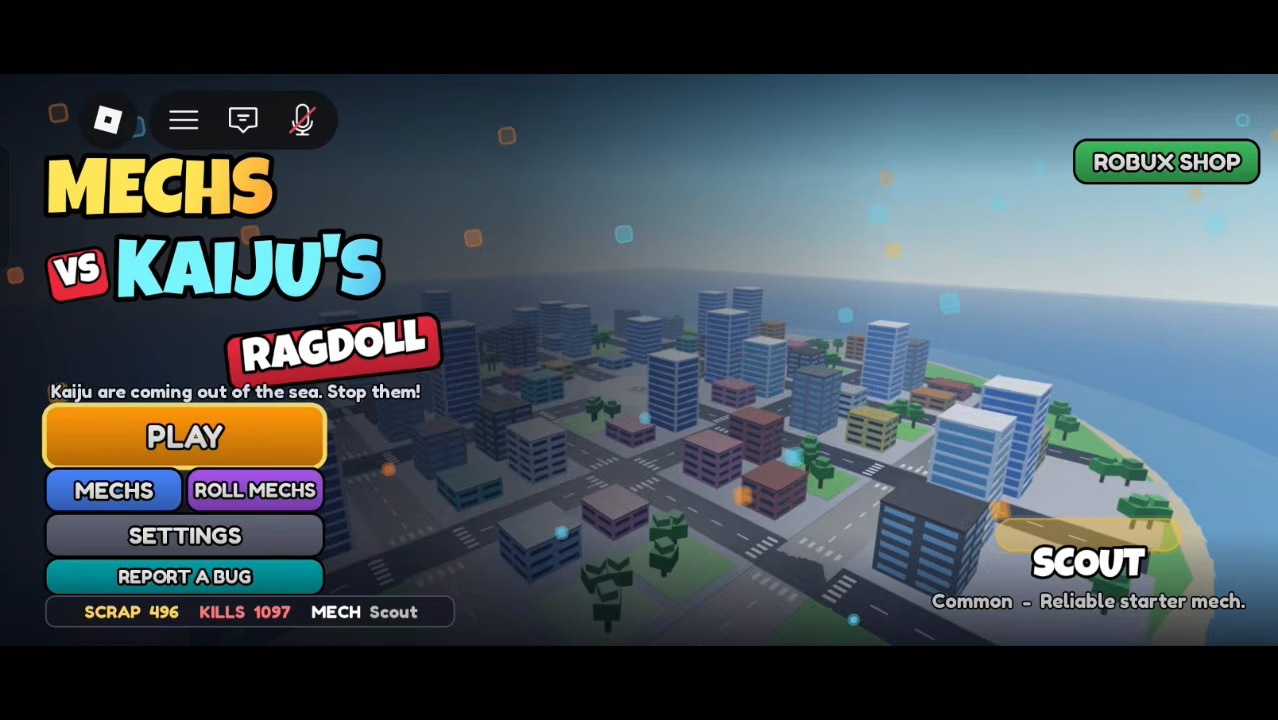
The documented condition is that you are in the game lobby: from the lobby menu, click the green ROBUX SHOP button at the top-right corner of the screen whenever you are between matches.
How to redeem a code in the shop
The code redemption section sits at the bottom of the Robux Shop UI, below the store content, so the main trick is simply to keep scrolling until you see the TYPE A CODE box. From a fresh launch, the full path looks like this:
- Launch Mechs vs Kaiju's Ragdoll and stay in the lobby menu.
- Click the green ROBUX SHOP button at the top-right corner of the screen.
- Scroll down through the shop until you reach the code redemption section at the bottom.
- Enter an active code in the TYPE A CODE text box.
- Click the REDEEM button to collect the reward.
If the REDEEM button does not pay out, the two conditions worth checking are the group-member rule below and whether you have already used that code on this account — each code works only once per account.
Like, favorite and join before you redeem
Codes in this game are designated for group members. The developer's Roblox page says to like + favorite the game and join the Mechs vs Kaiju Studios group to use them, and the studio's own update notes repeat that codes are for group members. Do those three account steps first, then head into the shop:
Checklist
- Like the game
Hit Like on the official Mechs vs Kaiju's Ragdoll page on Roblox.
- Favorite the game
Add the experience to your favorites from the same Roblox page.
- Join the Mechs vs Kaiju Studios group
Join the developer's community on Roblox — codes are designated for its members.
Because the developer has been adding new codes alongside updates, the current working strings live on the codes page rather than in this guide, while the developer's instructions point to the same place — the bottom of the shop.
What else the Robux Shop sells
The Robux Shop does double duty as the game's storefront: it is where the developer advertises codes and sells game passes and other offer content. As of the November 2026 DRILL UPDATE period, Drill Mastery and 2x Scrap are among the passes associated with the experience, but offer contents can change with updates, so treat whatever is listed inside the shop as the current lineup rather than a fixed one. For a closer look at what passes exist, see the gamepasses page; the 2x Scrap pass and general Robux purchases are covered on their own pages.
Redeem codes before your first match
While the game is in Early Release, getting-started guidance puts the shop's code box as step one for a new player: redeem everything before your first serious run so pack openings in the lobby are not delayed by missing scrap. Typical Early Release code gifts include scrap, packs, lucky packs and short scrap multipliers — resources you will then spend on mech packs in the lobby.
Once the code box is out of unused strings, the scrap guide covers earning more, and the mech packs page explains what to spend it on.